The Anatomy of a Drop List: Reading Every Column Like a Pro
Open any serious expired domains list and you face a wall of abbreviations: RD, BL, TF, CF, DA, ACR, SG. Veterans scan a row in two seconds because they know exactly what each column measures, and, just as importantly, what it does not. This guide walks the standard columns left to right: the identity columns, the link columns, the authority columns and the age columns, with the common misread for each.
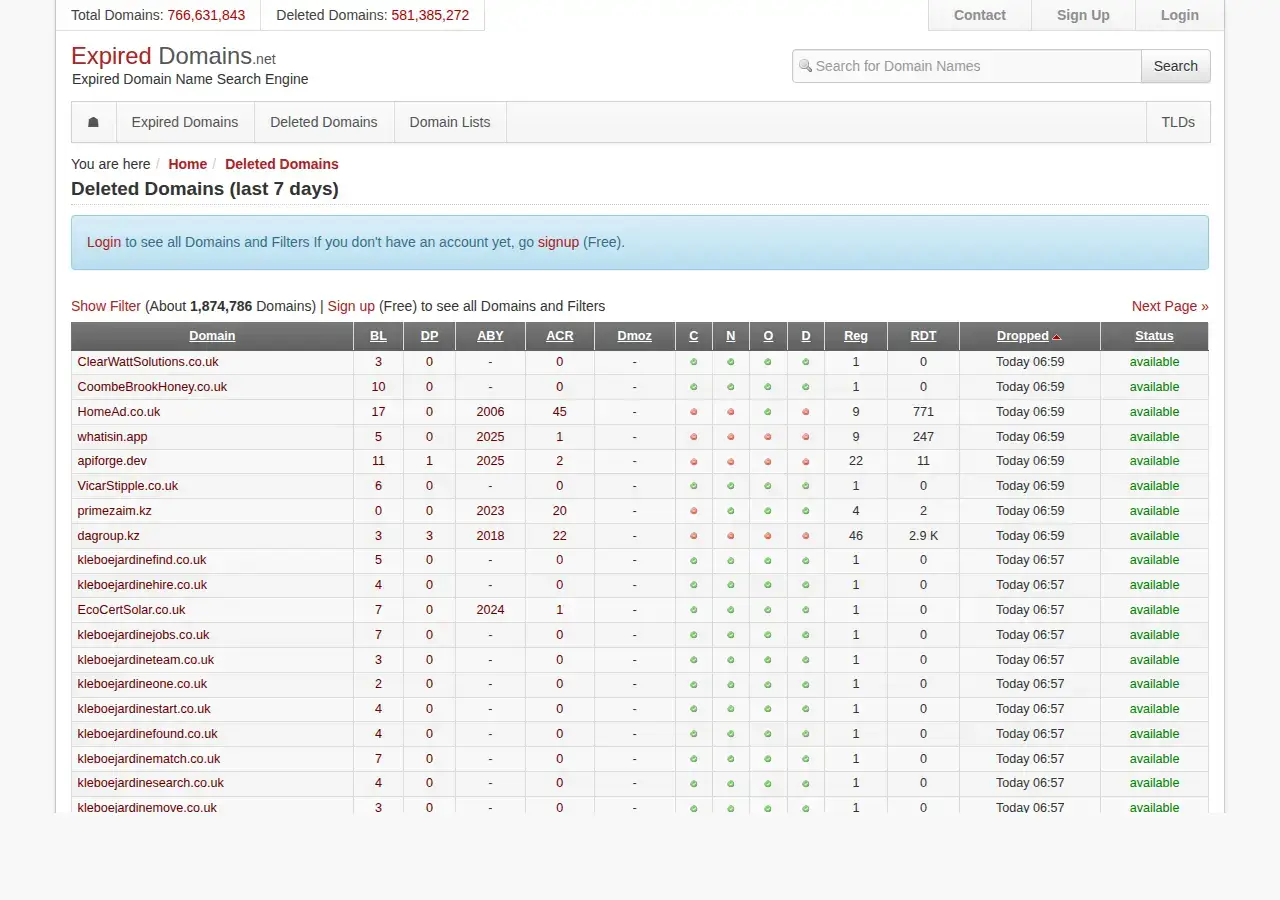
The deleted domains view on ExpiredDomains.net, the column layout decoded in this guide, captured August 2026
The identity columns: name, TLD, status, drop date
The name and TLD are self-explanatory. Status is not, and it is the single most misread column on any list. "Expiring" or "auction" means the domain is inside its registrar grace window (0-45 days) and being sold before it ever drops; win it and the original registration, and therefore its age, carries over. "Pending delete" means the registry-level countdown has started: exactly 5 days, unstoppable, ending in a public drop where catching resets the registration. "Dropped" or "deleted" means it already fell and may be hand-registerable right now. The same domain name means a different product in each state, at a different price, through a different checkout. Our guide to pending delete lists covers the countdown states in detail.
The drop date column tells you when the name becomes catchable. For .com and .net that means the daily Verisign release starting around 2:00 pm US Eastern; other registries run their own schedules. Misread: treating the drop date as a deadline for thinking. Backorders at the major catchers need to be in before the final day, so a drop date of "tomorrow" means the research window is closing today.
The link columns: BL, RD and the Majestic pair
BL (backlinks) counts individual links and is the most inflated number on the page: one sitewide footer can add tens of thousands. RD (referring domains) counts unique linking websites and is the number professionals actually filter on; 20+ screens out most junk and 50+ marks a real asset. The classic misread is being impressed by BL at all. Read BL only in ratio to RD: 3,000 backlinks from 150 domains is a normal shape, while 3,000 backlinks from 9 domains is one link pasted everywhere.
TF (Trust Flow) estimates proximity to Majestic's trusted seed sites; CF (Citation Flow) measures raw link volume. Neither means much alone. Their ratio is the fast spam check: TF:CF below roughly 0.3 is a red flag, 0.5+ is comfortable, and the misread is celebrating a clean ratio on tiny numbers, where TF 3 against CF 5 passes the ratio and fails the point. Set a TF floor of 10-15 alongside any ratio filter, as covered in our filter settings guide.
The authority columns: DA, DR and spam scores
Moz's DA and Ahrefs' DR both predict ranking strength on a 0-100 scale, and both are third-party estimates, not Google data. Two things make them treacherous on lists. First, refresh lag: DR updates roughly every 12 hours while DA refreshes roughly monthly, so a domain whose links are evaporating can wear last month's score. Second, disagreement: authority tools differ by about 26 points on average for the same site, so a DA 38 next to a DR 12 is not a contradiction, it is normal. Misread: sorting the whole list by DA and calling the top rows "the good ones". Use authority scores as tiebreakers after RD and TF:CF have done the work.
Spam scores are the inverse check. Moz Spam Score under 10% is generally treated as clean, and SpamZilla's SZ score aggregates its own red flags; our SpamZilla review tested where that score is sharp and where it is blunt. Misread in both directions: a low spam score is not an all-clear (scores read numbers, not content), and a moderate one is not always fatal. Treat spam columns as a second opinion that triggers a manual look, never as a verdict.
The age columns: birth year, WHOIS age and the archive
Age columns blur two different clocks. Registration age comes from WHOIS and resets to zero when a domain fully drops and is re-registered; a domain born in 2009 that dropped in 2024 shows a 2024 birth year today. Archive age, usually shown as the year of the first Wayback Machine snapshot and a snapshot count, survives the drop and is much harder to fake. The misread is trusting a young WHOIS date as proof a domain has no history, or an old first-snapshot year as proof of continuous history. A 2011 first snapshot with a five-year dark gap and a burst of foreign-language pages in the middle is a burned domain wearing an old birthday.
Every column at a glance
| Column | What it actually measures | Classic misread |
|---|---|---|
| Status | Lifecycle stage: auction (keeps age), pending delete (5-day countdown), dropped | Treating all states as the same product |
| Drop date | When the registry releases the name (.com/.net: daily ~2 pm US Eastern) | Forgetting backorders must be in earlier |
| BL | Total individual links, sitewide links included | Reading it without dividing by RD |
| RD | Unique linking websites | None; this is the column to trust first |
| TF / CF | Majestic link quality and link volume estimates | Accepting a good ratio on single-digit values |
| DA / DR | Third-party ranking predictions, refreshed monthly / ~12-hourly | Sorting by DA and calling it due diligence |
| Spam score | Automated red-flag count (Moz <10% treated clean) | Reading low spam as an all-clear |
| Birth year | Current WHOIS registration date, which resets on a drop | Mistaking it for the domain's real history |
| Archive columns | First Wayback snapshot year and snapshot count | Not opening the snapshots to check for gaps and topic flips |
Which columns should you sort by?
Sort by RD descending for a value-first pass, or TF descending when you want quality candidates surfacing early, and never by DA or BL. Then read rows right to left: archive history first (is the story coherent?), then TF:CF (is the profile honest?), then RD (is there enough of it?), and only then the name itself. Where the columns come from matters too: free lists carry thinner metric sets, while aggregators such as DomCop attach Majestic and Moz columns to every row precisely so this scan works without tab-switching. Whatever the source, the columns are instruments, and instruments drift; the row is a reason to investigate, never a reason to bid.
Frequently asked questions
What is the most important column on an expired domains list?
Referring domains, with the TF:CF ratio immediately behind it. RD is the hardest number to inflate cheaply, and the ratio exposes profiles built on volume without trust. Everything else refines what those two suggest.
What does the status column mean on a drop list?
It tells you which lifecycle stage the domain is in: expiring or at auction (sold before dropping, keeps its registration age), pending delete (drops within 5 days, age will reset), or already dropped and possibly hand-registerable.
Why do DA and DR disagree so often?
Different crawlers, different link indexes, different models and different refresh cycles: DR updates roughly every 12 hours, DA roughly monthly. Authority tools disagree by about 26 points on average for the same site, so divergence is the norm.
Is domain age on lists accurate?
The WHOIS birth year is accurate about the current registration only; it resets when a domain drops. For real history, read the archive columns and open the Wayback snapshots themselves, looking for gaps and topic changes.
Sources
- ICANN: EPP status codes
- ExpiredDomains.net (list columns and filters)
- Wayback Machine (archive history)
- DomCop: buying expired domains
- WhoisFreaks: the domain lifecycle and pending delete